
The Thrify platform / Agents & Automation
Less investigation.
More engineering.
Thrify prepares the findings and evidence. Your engineers decide what changes.

Investigation prepared.
Predefined workflows
After engineer approvalOverview
One quest, from finding to approval
Validate the opportunity.
Only validated priorities reach your engineers.
Investigate the evidence.
Get the context without collecting it yourself.
Deliver it to the team.
Receive the quest where your team works.
Meet the agents
Three agents.
One connected workflow.
See why a validated quest deserves attention, inspect the context behind it and follow its path to an approved action.


scout
Focus on work worth your team’s time.
Only validated, prioritized quests and anomalies reach your dashboard. Each comes with the evidence and context that explain why it deserves your engineers’ time.
Review the proposed change and approve how it should be carried out. A valid quest is not permission to delete a resource.
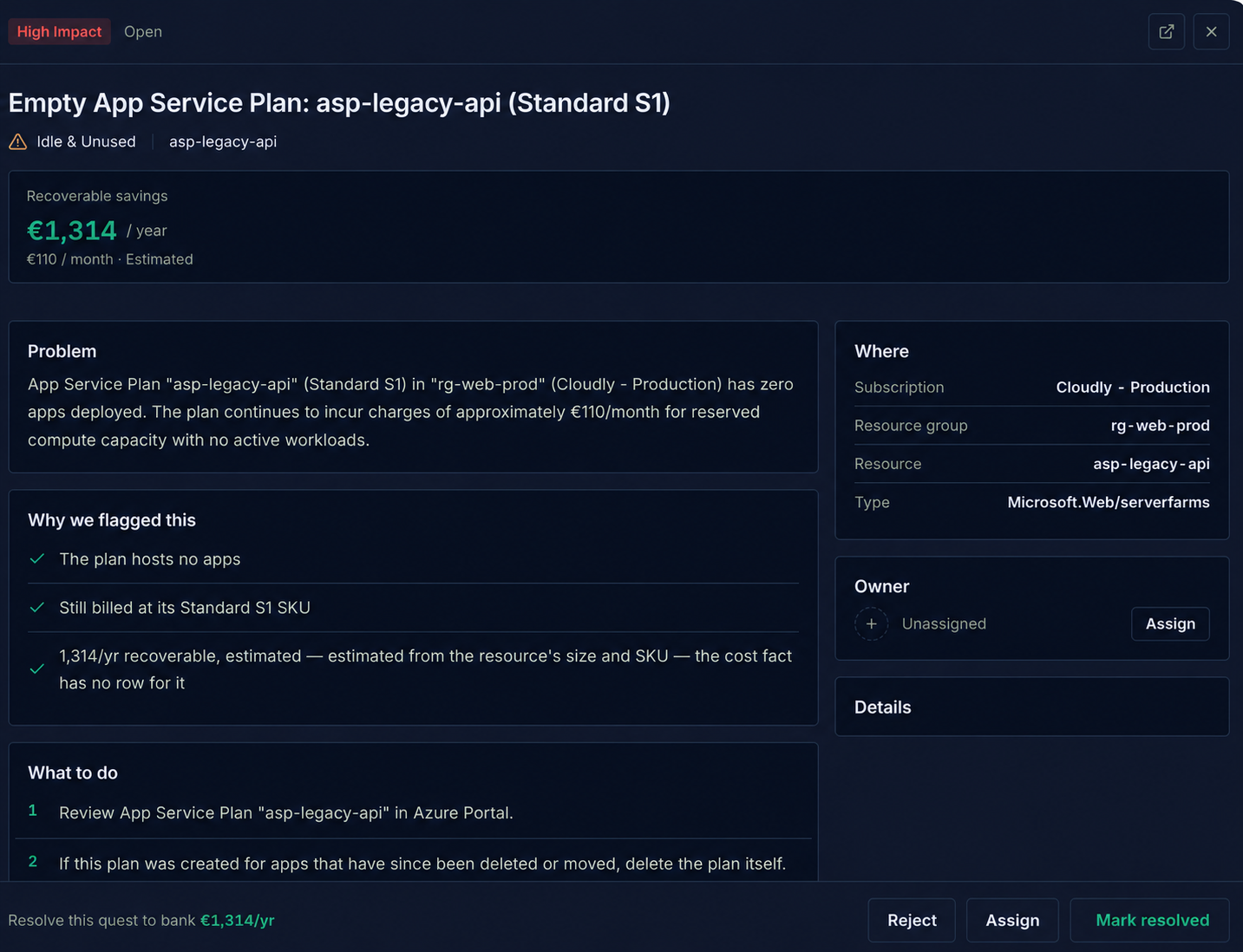
Validated quest
Supplied quest. Demonstration only.Idle & Unused
Unattached disk: validated opportunity
disk-vm-worker-old-osdisk · Cloudly - Production · rg-web-prod
- Priority
- High
- Status
- Open
- Owner in supplied screenshot
- Unassigned
- Disk
- Managed disk, 256 GB Premium_LRS
- Observed state
- Not attached to a virtual machine
- Evidence source
- Inventory
- Estimated monthly cost
- Approximately €54
- Estimated annual potential
- €648/year
This disk continues to incur approximately €54 in monthly storage charges while no active VM workload benefits from it. That recurring cost is why this high-priority quest appears on the dashboard.
More time for engineering
Spend less time investigating.
More time building.
Thrify gathers the context and explains the priority, so engineers can review a change instead of rebuilding the investigation.
Skip the manual evidence hunt.
Let Analyst gather the relevant context.
See why this quest matters.
See why the quest is a validated priority.
Get it to the right team.
Automatic routing follows the rules defined during setup.
Approve the specific change.
Your team approves the specific action before execution.
Automation / Planned. Launching 15 December 2026
Approve the change.
Let automation do the work.
For supported changes, the planned workflow takes your approval into a predefined automation. The agent provides evidence; your team authorizes the action.
- 01
Your approval
Review the investigation and confirm the specific action.
Available in this preview - 02
Supported automation
The predefined automation carries out the approved change.
Planned capability - 03
Measured result
Keep the result separate from the original savings estimate.
Clear responsibilities
Know what the agents do.
Know what stays with you.
What supports an agent’s recommendation?
The available evidence and context behind a validated quest. In this example, Inventory shows an unattached, billed disk.
Does every finding need to become a change?
No. Retention, recovery or planned reattachment may mean that no action is appropriate.
Where does my team continue the work?
Coordinator routes the quest using predefined rules. The example message links back to its detail in Thrify.
Are agents the same as automation?
No. Agents analyze and recommend. Predefined automations execute supported changes only after approval.
Free 5-day Savings Discovery
Find room for growth
in your cloud budget.
Explore potential annual savings and the categories behind them.
Free. No commitment. No environment access is required for this call.
We’ll agree on the scope and next steps. Five business days once the agreed data and access are available.